new LabelCollection()
A collection of renderable labels. Each label can have different fonts, colors, proportions, etc.
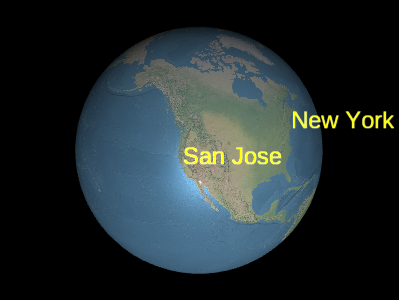
Example labels
LabelCollection#add and LabelCollection#removeadd and remove labels from the collection.
Performance:
For optimal performance, it is best to use several sets, each with many labels, rather than multiple sets, each with only a few labels. Avoid some labels changing every frame while others do not; On the contrary, create one or more sets for static labels and one or more sets for dynamic labels.
| Name | Type | Default | Description |
|---|---|---|---|
options.modelMatrix |
Matrix4 | Matrix4.IDENTITY |
optional
4x4 transformation matrix, used to transform each label from model coordinates to geographic coordinates. |
options.debugShowBoundingVolume |
Boolean | false |
optional
Only for debugging purposes. Determine whether to display the command bounding ball for the primitive. |
options.scene |
Scene |
optional
It is necessary to input labels that use high reference attributes or labels that will undergo depth testing based on the Earth. |
|
options.blendOption |
BlendOption | BlendOption.OPAQUE_AND_TRANSLUCENT |
optional
Label mixing options. The default value is used to render opaque and semi transparent labels. However, if all labels are completely opaque or semi transparent, setting the technique to BillboardRenderTechnice.OPAQUE or BillboardRenderTechnic.TRANSLUCENT can increase performance by up to 2 times. |
Example
// Create a label collection with two labels
var labels = scene.primitives.add(new SuperMap3D.LabelCollection());
labels.add({
  position : new SuperMap3D.Cartesian3(1.0, 2.0, 3.0),
  text : 'A label'
});
labels.add({
  position : new SuperMap3D.Cartesian3(4.0, 5.0, 6.0),
  text : 'Another label'
});
Members
-
billboardModeBillboardMode
-
Obtain billboard mode.
-
blendOptionBlendOption
-
Label mixing options. The default value is used to present opaque and semi transparent labels. However, if all labels are completely opaque or semi transparent, setting the technique to BillboardRenderTechnice.OPAQUE or BillboardRenderTechnic.TRANSLUCENT can double the performance.
- Default Value: BlendOption.OPAQUE_AND_TRANSLUCENT
debugShowBoundingVolumeBoolean
This property is only used for debugging to draw a bounding ball for each drawing command in the primitive.
- Default Value: false
fadeChageBoolean
Get or set whether to enable fade in and fade out effects.
lengthNumber
Return the number of labels in this collection. This is usually used in conjunction with LabelCollection # get to traverse all labels in a collection.
modelMatrixMatrix4
Convert each label in this set from model coordinates to a 4x4 transformation matrix of geographic coordinates. When this is an identity matrix, the labels are drawn in geographic coordinates, i.e. WGS84 coordinates. Local reference frames can be used by providing different transformation matrices, just like what Transforms.eastNorthUpToFixedFrame returns.
- Default Value:
Matrix4.IDENTITYExample
var center = SuperMap3D.Cartesian3.fromDegrees(-75.59777, 40.03883);
labels.modelMatrix = SuperMap3D.Transforms.eastNorthUpToFixedFrame(center);
labels.add({
  position : new SuperMap3D.Cartesian3(0.0, 0.0, 0.0),
  text     : 'Center'
});
labels.add({
  position : new SuperMap3D.Cartesian3(1000000.0, 0.0, 0.0),
  text     : 'East'
});
labels.add({
  position : new SuperMap3D.Cartesian3(0.0, 1000000.0, 0.0),
  text     : 'North'
});
labels.add({
  position : new SuperMap3D.Cartesian3(0.0, 0.0, 1000000.0),
  text     : 'Up'
});
readonly s3MlayerIdNumber
Get or set the ID.
selectedColorColor
Retrieve or set the highlighted color of the selected label.
swipeEnabledBoolean
Set whether to enable the rolling shutter function, the default value is false.
- Default Value: false
swipeRegionBoundingRectangle
Set the upper left and lower right corners of the rolling shutter area, type: BoundingRectangle, default value is new ,SuperMap3D.BoundingRectangle(0.0,0.0,1.0,1.0)。
- Default Value: new
Methods
-
add(options){Label}
-
Create tags with specified initial attributes and add them to the collection. Return the added tags so that they can be modified or removed from the collection later.
Performance:
Calling add is the expected constant time. However, the vertex buffer of the set is rewritten; These operations are O (n) and can also result in CPU to GPU overhead. To achieve optimal performance, add as many bulletin boards as possible before calling update.
Name Type Description optionsObject optional Template for describing tag attributes, as shown in Example 1.
Throws:
-
The object is destroyed by calling destroy().
- Type
- DeveloperError
Returns:
Type Description Label Add tags to the collection. Examples
// Example 1:  Add a label, specifying all the default values.
var l = labels.add({
  show : true,
  position : SuperMap3D.Cartesian3.ZERO,
  text : '',
  font : '30px sans-serif',
  fillColor : SuperMap3D.Color.WHITE,
  outlineColor : SuperMap3D.Color.BLACK,
  outlineWidth : 1.0,
  showBackground : false,
  backgroundColor : new SuperMap3D.Color(0.165, 0.165, 0.165, 0.8),
  backgroundPadding : new SuperMap3D.Cartesian2(7, 5),
  style : SuperMap3D.LabelStyle.FILL,
  pixelOffset : SuperMap3D.Cartesian2.ZERO,
  eyeOffset : SuperMap3D.Cartesian3.ZERO,
  horizontalOrigin : SuperMap3D.HorizontalOrigin.LEFT,
  verticalOrigin : SuperMap3D.VerticalOrigin.BASELINE,
  scale : 1.0,
  translucencyByDistance : undefined,
  pixelOffsetScaleByDistance : undefined,
  heightReference : HeightReference.NONE,
  distanceDisplayCondition : undefined
});
// Example 2: Specify only the label's cartographic position, // text, and font. var l = labels.add({ position : SuperMap3D.Cartesian3.fromRadians(longitude, latitude, height), text : 'Hello World', font : '24px Helvetica', }); -
-
contains(label){Boolean}
-
Check if the set contains the given label.
Name Type Description labelLabel The label to be checked.
- See:
Returns:
Type Description Boolean If the collection contains labels, it is true; otherwise, it is false. -
containsLabel(id){Boolean}
-
Check if this collection contains labels by ID.
Name Type Description idString The tag ID to be checked.
- See:
Returns:
Type Description Boolean If this collection contains the label, it is true; otherwise, it is false. -
destroy(){undefined}
-
Destroy the WebGL resources held by the object. Destroying an object can release WebGL resources deterministically, rather than relying on a garbage collector to destroy the object. Once the object is destroyed, it cannot be used again; Calling any function other than isDestroyed will result in a Developer Error exception. Therefore, please assign the return value (undefined) to the object using the method shown in the example.
Throws:
-
The object has been destroyed, i.e. destroy() has been called.
- Type
- DeveloperError
Returns:
Type Description undefined Example
labels = labels && labels.destroy(); -
-
get(index){Label}
-
Return the label at the specified index in the collection. The index is zero and increases with the increase of tags. Deleting a tag will move all subsequent tags to the left, thereby changing their index. This function is typically used in conjunction with LabelCollection # length to traverse all labels in a collection.
Performance:
Expected constant time. If the tag is removed from the collection and Scene # render is not called, perform an implicit O (n) operation.
Name Type Description indexNumber Zero based index of bulletin board.
Throws:
-
The object has been destroyed, i.e. destroy() has been called.
- Type
- DeveloperError
Returns:
Type Description Label Specify the label at the index. Example
// Toggle the show property of every label in the collection var len = labels.length; for (var i = 0; i < len; ++i) { var l = billboards.get(i); l.show = !l.show; } -
-
getVisibleInViewport(index){Boolean}
-
Obtain the visibility of the viewport corresponding to the layer
Name Type Description indexNumber Index
Throws:
-
the index is 0~8
- Type
- DeveloperError
Returns:
Type Description Boolean Visible visibility -
-
isDestroyed(){Boolean}
-
If the object has been destroyed, return true; Otherwise, return false. If the object has been destroyed, it should not be used; Calling any function other than isDestroyed will result in a Developer Error exception.
Returns:
Type Description Boolean If the object has been destroyed, it is true; Otherwise, it is false. -
remove(label){Boolean}
-
Remove tags from the collection. Once removed, the label is no longer available.
Performance:
The call to remove is an expected constant time. However, the vertex buffer of the set will be overwritten, which is an O (n) operation and also results in CPU to GPU overhead. For optimal performance, please remove as many tags as possible before calling update. If you plan to temporarily hide tags, calling # show is usually more effective than deleting and re adding tags.
Name Type Description labelLabel The label to be removed.
Throws:
-
The object is destroyed by calling destroy().
- Type
- DeveloperError
Returns:
Type Description Boolean If the tag has been deleted, it is true; If the tag cannot be found in the collection, it is false. Example
var l = labels.add(...); labels.remove(l); // Returns true -
-
removeAll()
-
Delete all labels in the collection.
Performance:
O(n)。 Removing all labels from a collection and adding new ones is more efficient than creating a completely new collection.
Throws:
-
The object has been destroyed, i.e. destroy() has been called.
- Type
- DeveloperError
Example
labels.add(...); labels.add(...); labels.removeAll(); -
-
setVisibleInViewport(index, visible)
-
Set layer corresponding viewport visibility
Name Type Description indexNumber Index
visibleBoolean visibility
Throws:
-
the index is 0~8
- Type
- DeveloperError
-