new Label()
Label category
Throws:
-
-
TranslucencyByDistance.far must be greater than the semi transparent distance.
- Type
- DeveloperError
-
-
-
PixelOffsetScaleByDistance.far must be greater than the pixel offset scale distance.
- Type
- DeveloperError
-
-
-
DistanceDisplayConditione.far must be greater than the distance display condition.
- Type
- DeveloperError
-
Members
-
static enableRightToLeftDetectionBoolean
-
Determines whether or not run the algorithm, that match the text of the label to right-to-left languages
- Default Value: false
Examples
// Example 1.
// Set a label's rightToLeft before init
SuperMap3D.Label.enableRightToLeftDetection = true;
var myLabelEntity = viewer.entities.add({
  label: {
    id: 'my label',
    text: 'זה טקסט בעברית \n ועכשיו יורדים שורה',
  }
});
// Example 2.
var myLabelEntity = viewer.entities.add({
label: {
id: 'my label',
text: 'English text'
}
});
// Set a label's rightToLeft after init
SuperMap3D.Label.enableRightToLeftDetection = true;
myLabelEntity.text = 'טקסט חדש';backgroundColorColor
Get or set the background color of this label.
- Default Value: new Color(0.165, 0.165, 0.165, 0.8)
backgroundPaddingCartesian2
Get or set the background fill (in pixels) for the label. The x-value controls horizontal filling, while the y-value controls vertical filling.
- Default Value: new Cartesian2(7, 5)
disableDepthTestDistanceNumber
Get or set the distance from the camera, at which depth testing will be disabled to prevent situations such as cropping with terrain. When set to 0, deep testing is always applied. When set to Number. POSITIVE.INFINITY, deep testing will never be applied.
- Default Value: 0.0
distanceDisplayConditionDistanceDisplayCondition
Gets or sets a condition that specifies this label to be displayed at a distance from the camera.
- Default Value: undefined
eyeOffsetCartesian3
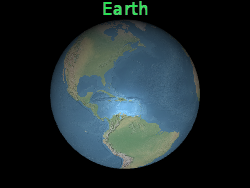
Obtain and set the 3D Cartesian offset applied to this label in the viewpoint coordinates. The viewpoint coordinate is a left-hand coordinate system, where x points to the right of the viewer, y points upwards, and z points to the screen. The viewpoint coordinates use the same scale as geographic and model coordinates, usually in meters. Viewpoint shift is commonly used to arrange multiple labels or objects at the same location, such as placing labels on their corresponding 3D models. Below, this label is located at the center of the Earth, but a viewpoint offset causes it to always appear at the top of the Earth, regardless of the viewer or the direction of the Earth.
 |
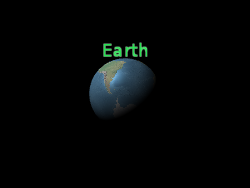 |
l.eyeOffset = new Cartesian3(0.0, 8000000.0, 0.0);- Default Value: Cartesian3.ZERO
fillColorColor
Get or set the fill color for this label.
- Default Value: Color.WHITE
fontString
Get or set the font used to draw this label. The syntax for specifying fonts is the same as the 'font' property in CSS.
- Default Value: '30px sans-serif'
heightReferenceHeightReference
Get or set the height parameter of the bulletin board.
- Default Value: HeightReference.NONE
horizontalOriginHorizontalOrigin
Get or set the horizontal origin of this label, which determines whether the label is drawn to the left, middle, or right of its anchor position.
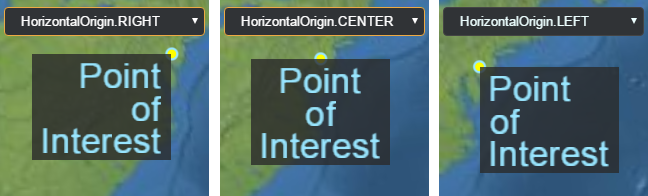
- Default Value: HorizontalOrigin.LEFT
Example
// Use a top, right origin
l.horizontalOrigin = SuperMap3D.HorizontalOrigin.RIGHT;
l.verticalOrigin = SuperMap3D.VerticalOrigin.TOP;idObject
Retrieve or set the user-defined object returned when selecting a label.
isPickedBoolean
Get or set whether it is selected
opacityStateObject
Get or set the compressed gradient transparency
outlineColorColor
Get or set the outline color of this label.
- Default Value: Color.BLACK
outlineWidthNumber
Get or set the contour width of this label.
- Default Value: 1.0
pixelOffsetCartesian2
Get or set the pixel offset relative to the origin of this label in screen space. This is typically used to align multiple labels and bulletin boards in the same location, such as images and text. The origin of the screen space is located in the upper left corner of the canvas; X increases from left to right, and y increases from top to bottom.
default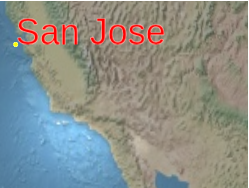 |
l.pixeloffset = new Cartesian2(25, 75);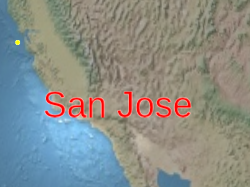 |
- Default Value: Cartesian2.ZERO
pixelOffsetScaleByDistanceNearFarScalar
Obtain or set the near pixel and far pixel offset scaling properties of the label based on its distance from the camera. The pixel offset of the label will be scaled between NearFarScalar # nearValue and NearFarScalar # farValue, while the camera distance falls within the specified upper and lower boundaries of NearFarScalar # near and NearFarScalar # far. Outside of these ranges, the pixel offset scaling of the labels is still limited to the nearest range. If not defined, pixelOffsetScaleByDistance will be disabled.
Examples
// Example 1.
// Set a label's pixel offset scale to 0.0 when the
// camera is 1500 meters from the label and scale pixel offset to 10.0 pixels
// in the y direction the camera distance approaches 8.0e6 meters.
text.pixelOffset = new SuperMap3D.Cartesian2(0.0, 1.0);
text.pixelOffsetScaleByDistance = new SuperMap3D.NearFarScalar(1.5e2, 0.0, 8.0e6, 10.0);
// Example 2.
// disable pixel offset by distance
text.pixelOffsetScaleByDistance = undefined;positionCartesian3
Get or set the Cartesian position of this tag.
scaleNumber
Get or set a uniform ratio that multiplies the label size (in pixels). 1.0 does not change the size of the label, scales larger than 1.0 will enlarge the label, and positive scales smaller than 1.0 will shrink the label. Applying a larger proportion value may cause the label to be pixelated. To make the text larger without pixelation, use a larger font size when calling Label # font.
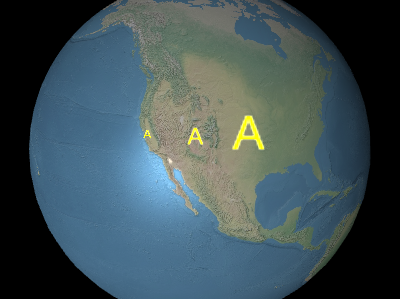
The image above, from left to right, shows
0.5、1.0、2.0。
- Default Value: 1.0
scaleByDistanceNearFarScalar
Obtain or set the zoom attribute of the label based on its distance from the camera. The scale of the label will be interpolated between NearFarScalar # nearValue and NearFarScalar # farValue, while the camera distance falls within the specified upper and lower boundaries of NearFarScalar # near and NearFarScalar # far. Outside of these ranges, the scale of the label is still limited to the nearest range. If not defined, scaleByDistance will be disabled.
Examples
// Example 1.
// Set a label's scaleByDistance to scale by 1.5 when the
// camera is 1500 meters from the label and disappear as
// the camera distance approaches 8.0e6 meters.
label.scaleByDistance = new SuperMap3D.NearFarScalar(1.5e2, 1.5, 8.0e6, 0.0);
// Example 2.
// disable scaling by distance
label.scaleByDistance = undefined;showBoolean
Decide whether to display the label. Use it to hide or display labels instead of deleting and re adding them to the collection.
- Default Value: true
showBackgroundBoolean
Decide whether to display the background behind the label.
- Default Value: false
styleLabelStyle
Get or set the style of this label.
- Default Value: LabelStyle.FILL
textString
Get or set the text for this label.
totalScaleNumber
Gets the total scale of the label, which is the label's scale multiplied by the computed relative size of the desired font compared to the generated glyph size.
- Default Value: 1.0
translucencyByDistanceNearFarScalar
Obtain or set the semi transparent and semi transparent properties of the label based on its distance from the camera. The semi transparency of the label will be interpolated between NearFarScalar # nearValue and NearFarScalar # farValue, while the camera distance falls within the specified upper and lower boundaries of NearFarScalar # near and NearFarScalar # far. Beyond these ranges, the semi transparency of the label is still limited to the nearest range. If not defined, transucencyByDistance will be disabled.
Examples
// Example 1.
// Set a label's translucencyByDistance to 1.0 when the
// camera is 1500 meters from the label and disappear as
// the camera distance approaches 8.0e6 meters.
text.translucencyByDistance = new SuperMap3D.NearFarScalar(1.5e2, 1.0, 8.0e6, 0.0);
// Example 2.
// disable translucency by distance
text.translucencyByDistance = undefined;verticalOriginVerticalOrigin
Get or set the vertical origin of this label, which determines whether the label is located above, below, or at the center of its anchor position.
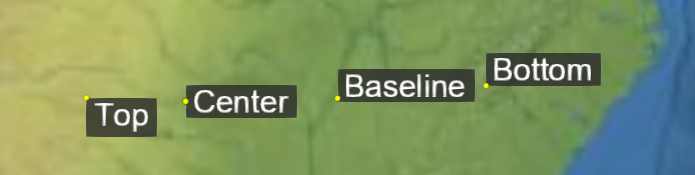
- Default Value: VerticalOrigin.BASELINE
Example
// Use a top, right origin
l.horizontalOrigin = SuperMap3D.HorizontalOrigin.RIGHT;
l.verticalOrigin = SuperMap3D.VerticalOrigin.TOP;
Methods
-
computeScreenSpacePosition(scene, result){Cartesian2}
-
Calculate the screen spatial position of the label origin, taking into account viewpoint offset and pixel offset. The origin of the screen space is located in the upper left corner of the canvas; X increases from left to right, and y increases from top to bottom.
Name Type Description sceneScene The scene where the label is located.
resultCartesian2 optional The object that stores the results.
Returns:
Type Description Cartesian2 The screen space position of the label. Example
console.log(l.computeScreenSpacePosition(scene).toString()); -
equals(other){Boolean}
-
Determine if this label is equal to another label. If all attributes of the label are equal, then the label is equal. Labels in different sets can be equal.
Name Type Description otherLabel The label to compare for equality.
Returns:
Type Description Boolean trueif the labels are equal; otherwise,false. -
isDestroyed(){Boolean}
-
If the object has been destroyed, return true; Otherwise, return false. If the object has been destroyed, it should not be used; Calling any function other than isDestroyed will result in a Developer Error exception.
Returns:
Type Description Boolean If the object has been destroyed, it is true; Otherwise, it is false.