new Billboard()
The image located and aligned with the viewport in a 3D scene is created and rendered using BillboardCollection. The bulletin board is created by calling BillboardCollection # add and setting its initial properties.
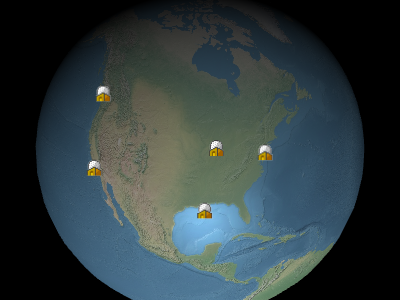
Example billboards
Performance:
Read attributes, for example, Billboard#show, It is a constant time. Assigning values to attributes is also a constant time. No matter how many attributes are updated, they are the same. If most of the bulletin boards in the collection need to be updated, a more effective method may be to use BillboardCollection # removeAll to clear the collection and add new bulletin boards, rather than modifying each bulletin board.
Throws:
-
-
ScaleByDistance.far must be greater than scaleByDistance.near
- Type
- DeveloperError
-
-
-
TransucencyByDistance.far must be greater than transucencyByDistance.near
- Type
- DeveloperError
-
-
-
PixelOffsetScaleByDistance.far must be greater than PixelOffsetScaleByDistance.near
- Type
- DeveloperError
-
-
-
DistanceDisplayConditione.far must be greater than distanceDisplayConditione.near
- Type
- DeveloperError
-
Members
-
alignedAxisCartesian3
-
Get or set the alignment axis in the geographic space. The aligned axis is the unit vector pointed by the upward vector of the bulletin board. The default value is a 0 vector, which means that the bulletin board is aligned with the upward vector of the screen.
Examples
// Example 1.
// Have the billboard up vector point north
billboard.alignedAxis = SuperMap3D.Cartesian3.UNIT_Z;
// Example 2. // Have the billboard point east. billboard.alignedAxis = SuperMap3D.Cartesian3.UNIT_Z; billboard.rotation = -SuperMap3D.Math.PI_OVER_TWO;// Example 3. // Reset the aligned axis billboard.alignedAxis = SuperMap3D.Cartesian3.ZERO; -
colorColor
-
Get or set the color to be multiplied with the texture of the bulletin board. There are two common use cases here. Firstly, the same white texture can be used by many different bulletin boards, each with a different color, to create a colorful bulletin board. Secondly, the alpha component of color can be used to make the bulletin board semi transparent, as shown in the following figure. Alpha value 0.0 makes the bulletin board transparent, while 1.0 makes the bulletin board opaque.
default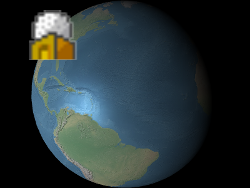
alpha : 0.5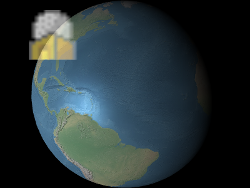
The red, green, blue, and alpha values are specified byvalue的red、green、blueandalphaproperties, as shown in Example 1. These components range from0.0(no intensity) to1.0(full intensity).Examples
// Example 1. Assign yellow.
b.color = SuperMap3D.Color.YELLOW;
// Example 2. Make a billboard 50% translucent. b.color = new SuperMap3D.Color(1.0, 1.0, 1.0, 0.5); -
disableDepthTestDistanceNumber
-
Get or set the distance from the camera, at which depth testing will be disabled to prevent situations such as cropping with terrain. When set to 0, deep testing is always applied. When set to Number. POSITIVE.INFINITY, deep testing will never be applied.
- Default Value: 0.0
distanceDisplayConditionDistanceDisplayCondition
Get or set conditions to specify how far away the bulletin board will be displayed from the camera.
- Default Value: undefined
eyeOffsetCartesian3
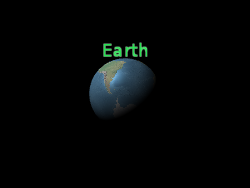
Get or set the 3D Cartesian offset applied to this bulletin board in viewpoint coordinates. The viewpoint coordinate is a left-hand coordinate system, where x points to the right of the viewer, y points upwards, and z points to the screen. The viewpoint coordinates use the same scale as geographic and model coordinates, usually in meters. Viewpoint shift is commonly used to arrange multiple bulletin boards or objects in the same position, such as placing bulletin boards on their corresponding 3D models. In the following picture, the bulletin board is located at the center of the Earth, but due to the deviation of the line of sight, regardless of the direction of the viewer or the Earth, the bulletin board always appears at the top of the Earth.
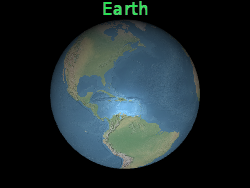 |
 |
b.eyeOffset = new Cartesian3(0.0, 8000000.0, 0.0);heightNumber
Get or set the height of the bulletin board. If not defined, use image height.
heightReferenceHeightReference
Get or set the height parameter of the bulletin board.
- Default Value: HeightReference.NONE
horizontalOriginHorizontalOrigin
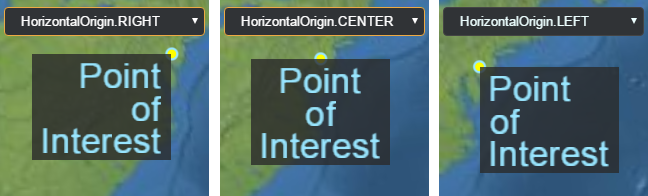
Get or set the horizontal origin of this bulletin board, which determines whether the bulletin board is to the left, middle, or right of its anchor position.
Example
// Use a bottom, left origin
b.horizontalOrigin = SuperMap3D.HorizontalOrigin.LEFT;
b.verticalOrigin = SuperMap3D.VerticalOrigin.BOTTOM;idObject
Retrieve or set user-defined objects returned when selecting a bulletin board.
imageString
Get or set the image used for this billboard. If the image has already generated a texture, reuse the existing texture directly.
Example
// load an image from a URL
b.image = 'some/image/url.png';

// assuming b1 and b2 are billboards in the same billboard collection,
// use the same image for both billboards.
b2.image = b1.image;pixelOffsetCartesian2
Get or set the pixel offset of the billboard in screen space relative to the origin. This attribute is commonly used to align multiple billboards and labels (such as images and text) in the same position. The origin of the screen space is located in the upper left corner of the canvas, with the x-axis increasing from left to right and the y-axis increasing from top to bottom.
default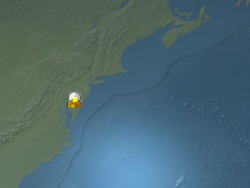 |
b.pixeloffset = new Cartesian2(50, 25);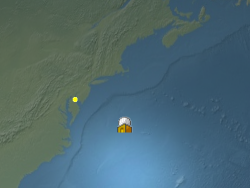 |
pixelOffsetScaleByDistanceNearFarScalar
Obtain or set the near pixel and far pixel offset scaling properties of the bulletin board based on the distance between the bulletin board and the camera. The pixel offset of the bulletin board will be scaled between NearFarScalar # nearValue and NearFarScalar # farValue, while the camera distance falls within the specified upper and lower boundaries of NearFarScalar # near and NearFarScalar # far. Outside of these ranges, the pixel offset ratio of the bulletin board is still limited to the nearest range. If not defined, pixelOffsetScaleByDistance will be disabled.
Examples
// Example 1.
// Set a billboard's pixel offset scale to 0.0 when the
// camera is 1500 meters from the billboard and scale pixel offset to 10.0 pixels
// in the y direction the camera distance approaches 8.0e6 meters.
b.pixelOffset = new SuperMap3D.Cartesian2(0.0, 1.0);
b.pixelOffsetScaleByDistance = new SuperMap3D.NearFarScalar(1.5e2, 0.0, 8.0e6, 10.0);
// Example 2.
// disable pixel offset by distance
b.pixelOffsetScaleByDistance = undefined;positionCartesian3
Get or set the Cartesian position of the bulletin board.
readonly readyBoolean
When the value is true, it indicates that the bulletin board has the rendering conditions, that is, the image download is completed and the WebGL resource has been created.
- Default Value: false
rotationNumber
Get or set the rotation angle in radians.
scaleNumber
Get or set a uniform ratio that multiplies the size of the bulletin board image in pixels. 1.0 does not change the size of the bulletin board; Enlarge the bulletin board with a scale greater than 1.0; A scaled down bulletin board with a positive scale less than 1.0.
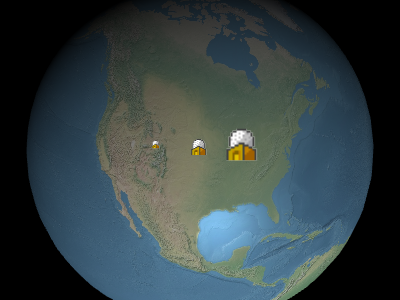
The image above, from left to right, shows
0.5、1.0、2.0。
scaleByDistanceNearFarScalar
Obtain or set the zoom attribute of the bulletin board based on the distance between the bulletin board and the camera. When the camera distance is within the specified range of NearFarScalar # nearValue and NearFarScalar # farValue, the scaling ratio of the bulletin board will be interpolated between NearFarScalar # nearValue and NearFarScalar # farValue. When these ranges are exceeded, the scaling ratio of the bulletin board will remain within the nearest range. If scaleByDistance is not defined, it will be disabled.
Examples
// Example 1.
// Set a billboard's scaleByDistance to scale by 1.5 when the
// camera is 1500 meters from the billboard and disappear as
// the camera distance approaches 8.0e6 meters.
b.scaleByDistance = new SuperMap3D.NearFarScalar(1.5e2, 1.5, 8.0e6, 0.0);
// Example 2.
// disable scaling by distance
b.scaleByDistance = undefined;showBoolean
Determine if this bulletin board is displayed. Hide or display bulletin boards by setting this property without removing and re adding them from the collection.
- Default Value: true
sizeInMetersBoolean
Get or set the unit of measurement for bulletin board size in meters or pixels. True indicates that the unit for the size of the bulletin board is meters; Otherwise, the unit of size is pixels.
- Default Value: false
translucencyByDistanceNearFarScalar
Obtain or set the semi transparent properties of the bulletin board based on the distance between the bulletin board and the camera. When the camera distance is within the specified upper and lower limits of NearFarScalar # nearValue and NearFarScalar # farValue, the semi transparency of the bulletin board will interpolate between NearFarScalar # nearValue and NearFarScalar # farValue. Outside of these two ranges, the translucency of the bulletin board will remain within the nearest range. If not defined, translatencyByDistance will be disabled.
Examples
// Example 1.
// Set a billboard's translucency to 1.0 when the
// camera is 1500 meters from the billboard and disappear as
// the camera distance approaches 8.0e6 meters.
b.translucencyByDistance = new SuperMap3D.NearFarScalar(1.5e2, 1.0, 8.0e6, 0.0);
// Example 2.
// disable translucency by distance
b.translucencyByDistance = undefined;verticalOriginVerticalOrigin
Get or set the vertical origin of this bulletin board, which determines whether the bulletin board is above, below, or at the center of its anchor position.
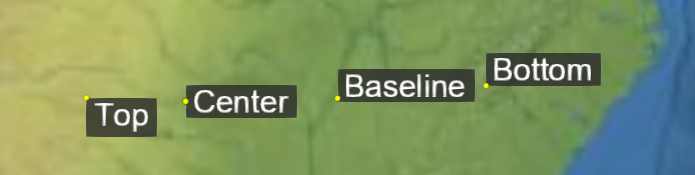
Example
// Use a bottom, left origin
b.horizontalOrigin = SuperMap3D.HorizontalOrigin.LEFT;
b.verticalOrigin = SuperMap3D.VerticalOrigin.BOTTOM;widthNumber
Get or set the width of the bulletin board. If not defined, use image width.
Methods
-
computeScreenSpacePosition(scene, result){Cartesian2}
-
Calculate the screen spatial coordinate position of the bulletin board origin (considering viewpoint offset and pixel offset). The origin of the screen space coordinate system is located in the upper left corner of the canvas, with the x-axis increasing from left to right and the y-axis increasing from top to bottom.
Name Type Description sceneScene Scene.
resultCartesian2 optional The object on which to store the results.
Throws:
-
The bulletin board must be in the assembly.
- Type
- DeveloperError
Returns:
Type Description Cartesian2 The screen space position of the bulletin board. Example
console.log(b.computeScreenSpacePosition(scene).toString()); -
-
equals(other){Boolean}
-
Determine whether the current bulletin board is equal to another bulletin board. If all attributes of both are the same, they are considered equal; Even bulletin boards belonging to different collections may be equal.
Name Type Description otherBillboard A target bulletin board that requires equality comparison.
Returns:
Type Description Boolean If the bulletin boards are equal, it is true; Otherwise, it is false. -
setImage(id, image)
-
Set the image for this bulletin board. If a texture has already been created for the given ID, use the existing texture. Only the first bulletin board will actually call this function and create a texture, while subsequent bulletin boards with the same ID will only reuse the existing texture. To load images from URLs, it is more convenient to set the Billboard # image attribute.
Name Type Description idString The ID of the image. It can be any string that uniquely identifies the image.
imageImage | Canvas | String | Billboard~CreateImageCallback The image to be loaded. This parameter can be a loaded image or Canvas, a URL to automatically load as an image, or a function to create an image when the image has not yet been loaded.
Example
// create a billboard image dynamically function drawImage(id) { // create and draw an image using a canvas var canvas = document.createElement('canvas'); var context2D = canvas.getContext('2d'); // ... draw image return canvas; } // drawImage will be called to create the texture b.setImage('myImage', drawImage); // subsequent billboards created in the same collection using the same id will use the existing // texture, without the need to create the canvas or draw the image b2.setImage('myImage', drawImage); -
setImageSubRegion(id, subRegion)
-
Use the local area of the specified ID image as the image for this bulletin board, and calculate the area coordinates in pixels based on the bottom left corner as the origin.
Name Type Description idString The ID of the image to be used.
subRegionBoundingRectangle Sub regions of the image.
Throws:
-
Images with IDs must be in the image set.
- Type
- RuntimeError
-
Type Definitions
-
CreateImageCallback(id){Image|Canvas|Promise.<(Image|Canvas)>}
-
Function for creating images.
Name Type Description idString The identifier of the image to be loaded.
Returns:
Type Description Image | Canvas | Promise.<(Image|Canvas)> Images, or promises that will be parsed into images.