new LabelCollection()
可渲染的标签集合。 每个标签可以有不同的字体、颜色、比例等。
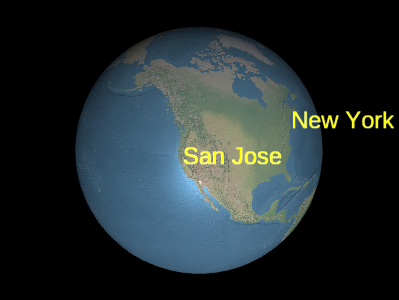
Example labels
LabelCollection#add 和 LabelCollection#remove从集合中添加和删除标签。
Performance:
为了获得最佳性能,最好使用几个集合,每个集合有许多标签,而不要使用多个集合,每个集合只有几个标签。 避免有些标签每帧都会改变,而有些标签不会;相反,为静态标签创建一个或多个集合,为动态标签创建一个或多个集合。
| Name | Type | Default | Description |
|---|---|---|---|
options.modelMatrix |
Matrix4 | Matrix4.IDENTITY |
可选
4x4 变换矩阵,用于将每个标签从模型坐标变换到地理坐标。 |
options.debugShowBoundingVolume |
Boolean | false |
可选
仅用于调试。确定是否显示该基元的命令包围球。 |
options.scene |
Scene |
可选
必须为使用高度参考属性的标签或将根据地球进行深度测试的标签输入。 |
|
options.blendOption |
BlendOption | BlendOption.OPAQUE_AND_TRANSLUCENT |
可选
标签混合选项。默认值用于渲染不透明和半透明标签。 不过,如果所有标签都完全不透明或完全半透明,将技术设置为 BillboardRenderTechnique.OPAQUE 或 BillboardRenderTechnique.TRANSLUCENT 最多可将性能提高 2 倍。 |
Example
// Create a label collection with two labels
var labels = scene.primitives.add(new SuperMap3D.LabelCollection());
labels.add({
  position : new SuperMap3D.Cartesian3(1.0, 2.0, 3.0),
  text : 'A label'
});
labels.add({
  position : new SuperMap3D.Cartesian3(4.0, 5.0, 6.0),
  text : 'Another label'
});
Members
-
billboardModeBillboardMode
-
获取广告牌模式。
-
blendOptionBlendOption
-
标签混合选项。默认值用于呈现不透明和半透明标签。 然而,如果所有的标签都是完全不透明的或者是完全半透明的,将技术设置为BillboardRenderTechnique.OPAQUE或BillboardRenderTechnique.TRANSLUCENT可以将性能提高2倍。
- Default Value: BlendOption.OPAQUE_AND_TRANSLUCENT
debugShowBoundingVolumeBoolean
此属性仅用于调试 为基元中的每个绘制命令绘制包围球。
- Default Value: false
fadeChageBoolean
获取或设置是否启用淡入淡出效果。
lengthNumber
返回此集合中标签的数目。这通常与LabelCollection#get一起使用,用于遍历集合中的所有标签。
modelMatrixMatrix4
将此集合中的每个标签从模型坐标转换为地理坐标的4x4变换矩阵。
当这是单位矩阵时,标签以地理坐标绘制,即WGS84坐标。
本地参考帧可以通过提供不同的转换矩阵来使用,就像Transforms.eastNorthUpToFixedFrame返回的那样。
- Default Value:
Matrix4.IDENTITYExample
var center = SuperMap3D.Cartesian3.fromDegrees(-75.59777, 40.03883);
labels.modelMatrix = SuperMap3D.Transforms.eastNorthUpToFixedFrame(center);
labels.add({
  position : new SuperMap3D.Cartesian3(0.0, 0.0, 0.0),
  text     : 'Center'
});
labels.add({
  position : new SuperMap3D.Cartesian3(1000000.0, 0.0, 0.0),
  text     : 'East'
});
labels.add({
  position : new SuperMap3D.Cartesian3(0.0, 1000000.0, 0.0),
  text     : 'North'
});
labels.add({
  position : new SuperMap3D.Cartesian3(0.0, 0.0, 1000000.0),
  text     : 'Up'
});
readonly s3MlayerIdNumber
获取或设置id。
selectedColorColor
获取或者设置标签选中高亮的颜色。
swipeEnabledBoolean
设置是否开启卷帘功能,默认值为false。
- Default Value: false
swipeRegionBoundingRectangle
设置卷帘区域左上角和右下角,类型:BoundingRectangle,默认值为new ,SuperMap3D.BoundingRectangle(0.0,0.0,1.0,1.0)。
- Default Value: new
Methods
-
add(options){Label}
-
创建具有指定初始属性的标签并将其添加到集合中。将返回添加的标签,以便稍后可以对其进行修改或从集合中删除。
Performance:
调用
add是预期的常量时间。 然而,集合的顶点缓冲区被重写;这些操作是O(n),并且还会导致CPU到GPU的开销。 为了获得最佳性能,在调用update之前添加尽可能多的布告板。Name Type Description optionsObject 可选 描述标签属性的模板,如示例1所示。
Throws:
-
该对象被销毁,即调用destroy()。
- Type
- DeveloperError
Returns:
Type Description Label 添加到集合中的标签。 Examples
// Example 1:  Add a label, specifying all the default values.
var l = labels.add({
  show : true,
  position : SuperMap3D.Cartesian3.ZERO,
  text : '',
  font : '30px sans-serif',
  fillColor : SuperMap3D.Color.WHITE,
  outlineColor : SuperMap3D.Color.BLACK,
  outlineWidth : 1.0,
  showBackground : false,
  backgroundColor : new SuperMap3D.Color(0.165, 0.165, 0.165, 0.8),
  backgroundPadding : new SuperMap3D.Cartesian2(7, 5),
  style : SuperMap3D.LabelStyle.FILL,
  pixelOffset : SuperMap3D.Cartesian2.ZERO,
  eyeOffset : SuperMap3D.Cartesian3.ZERO,
  horizontalOrigin : SuperMap3D.HorizontalOrigin.LEFT,
  verticalOrigin : SuperMap3D.VerticalOrigin.BASELINE,
  scale : 1.0,
  translucencyByDistance : undefined,
  pixelOffsetScaleByDistance : undefined,
  heightReference : HeightReference.NONE,
  distanceDisplayCondition : undefined
});
// Example 2: Specify only the label's cartographic position, // text, and font. var l = labels.add({ position : SuperMap3D.Cartesian3.fromRadians(longitude, latitude, height), text : 'Hello World', font : '24px Helvetica', }); -
-
contains(label){Boolean}
-
检查该集合是否包含给定的标签。
Name Type Description labelLabel 要检查的标签。
- See:
Returns:
Type Description Boolean 如果该集合包含标签,则为 true,否则为 false。 -
containsLabel(id){Boolean}
-
通过ID检查此集合是否包含标签。
Name Type Description idString 要检查的标签ID。
- See:
Returns:
Type Description Boolean 如果此集合包含该标签,则为true,否则为false。 -
destroy(){undefined}
-
销毁该对象持有的 WebGL 资源。 销毁对象可以确定性地释放 WebGL 资源,而不是依赖垃圾回收器来销毁该对象。
一旦对象被销毁,就不得再使用;调用 isDestroyed 以外的任何函数都将导致DeveloperError异常。因此,请按照示例中的方法将返回值(undefined)赋值给对象。Throws:
-
该对象已被销毁,即 destroy() 被调用。
- Type
- DeveloperError
Returns:
Type Description undefined Example
labels = labels && labels.destroy(); -
-
get(index){Label}
-
返回集合中指定索引处的标签。 索引为零,并随着标签的增加而增加。 删除一个标签会将其后的所有标签向左移动,从而改变它们的索引。 该函数通常与
LabelCollection#length一起使用,用于遍历集合中的所有标签。Performance:
期望常数时间。如果标签从集合中删除,并且没有调用
Scene#render,则执行隐式的O(n)操作。Name Type Description indexNumber 布告板的零基索引。
Throws:
-
该对象已被销毁,即 destroy() 被调用。
- Type
- DeveloperError
Returns:
Type Description Label 指定索引处的标签。 Example
// Toggle the show property of every label in the collection var len = labels.length; for (var i = 0; i < len; ++i) { var l = billboards.get(i); l.show = !l.show; } -
-
getVisibleInViewport(index){Boolean}
-
获得图层对应视口可见性
Name Type Description indexNumber 索引
Throws:
-
the index is 0~8
- Type
- DeveloperError
Returns:
Type Description Boolean visible 可见性 -
-
isDestroyed(){Boolean}
-
如果该对象已被销毁,则返回 true;否则返回 false。
如果该对象已被销毁,则不应使用;调用 isDestroyed 以外的任何函数都将导致DeveloperError异常。Returns:
Type Description Boolean 如果该对象已被销毁,则为 true;否则为 false。 -
remove(label){Boolean}
-
从集合中移除标签。一旦移除,标签就不再可用。
Performance:
调用remove是预期的常量时间。 然而,集合的顶点buffer会被重写,这是一个O(n)的操作,也会导致CPU到GPU的开销。 为了获得最佳性能,请在调用update之前删除尽可能多的标签。如果您打算暂时隐藏标签,调用
#show通常比删除并重新添加标签更有效。Name Type Description labelLabel 要去除的标签。
Throws:
-
该对象被销毁,即调用destroy()。
- Type
- DeveloperError
Returns:
Type Description Boolean 如果标签已被删除,则为 true;如果在集合中找不到该标签,则为 false。 Example
var l = labels.add(...); labels.remove(l); // Returns true -
-
removeAll()
-
删除集合中的所有标签。
Performance:
O(n)。从一个集合中删除所有标签 再添加新标签,比完全创建一个新的集合更有效率。
Throws:
-
该对象已被销毁,即 destroy() 被调用。
- Type
- DeveloperError
Example
labels.add(...); labels.add(...); labels.removeAll(); -
-
setVisibleInViewport(index, visible)
-
设置图层对应视口可见性
Name Type Description indexNumber 索引
visibleBoolean 可见性
Throws:
-
the index is 0~8
- Type
- DeveloperError
-