new Label()
标签类
Throws:
-
-
translucencyByDistance.far 必须大于半透明距离。
- Type
- DeveloperError
-
-
-
pixelOffsetScaleByDistance.far必须大于像素点偏移量标尺距离。
- Type
- DeveloperError
-
-
-
distanceDisplayCondition.far 必须大于距离显示条件。
- Type
- DeveloperError
-
Members
-
static enableRightToLeftDetectionBoolean
-
Determines whether or not run the algorithm, that match the text of the label to right-to-left languages
- Default Value: false
Examples
// Example 1.
// Set a label's rightToLeft before init
SuperMap3D.Label.enableRightToLeftDetection = true;
var myLabelEntity = viewer.entities.add({
  label: {
    id: 'my label',
    text: 'זה טקסט בעברית \n ועכשיו יורדים שורה',
  }
});
// Example 2.
var myLabelEntity = viewer.entities.add({
label: {
id: 'my label',
text: 'English text'
}
});
// Set a label's rightToLeft after init
SuperMap3D.Label.enableRightToLeftDetection = true;
myLabelEntity.text = 'טקסט חדש';backgroundColorColor
获取或设置此标签的背景颜色。
- Default Value: new Color(0.165, 0.165, 0.165, 0.8)
backgroundPaddingCartesian2
获取或设置该标签的背景填充(单位:像素)。 x 值控制水平填充,y 值控制垂直填充。
- Default Value: new Cartesian2(7, 5)
disableDepthTestDistanceNumber
获取或设置从相机开始的距离,在此距离上将禁用深度测试,以防止例如与地形的裁剪等情况的发生。 当设置为0时,深度测试始终应用。当设置为Number.POSITIVE_INFINITY时,深度测试永远不会应用。
- Default Value: 0.0
distanceDisplayConditionDistanceDisplayCondition
获取或设置条件,该条件指定将在距离相机的距离处显示此标签。
- Default Value: undefined
eyeOffsetCartesian3
获取并设置视点坐标中应用于此标签的三维Cartesian偏移量。
视点坐标是一个左手坐标系,其中x指向观看者的右侧,y指向上方,而z指向屏幕。
视点坐标使用与地理和模型坐标相同的尺度,通常是米。
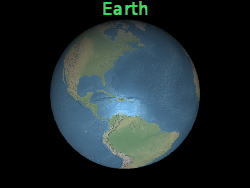
视点偏移通常用于在同一位置安排多个标签或对象,例如,将标签安排在其相应的三维模型之上。
下面,这个标签位于地球的中心,但一个视点偏移使它总是出现在地球的顶部,无论观看者或地球的方向。
 |
 |
l.eyeOffset = new Cartesian3(0.0, 8000000.0, 0.0);- Default Value: Cartesian3.ZERO
fillColorColor
获取或设置此标签的填充颜色。
- Default Value: Color.WHITE
fontString
获取或设置用于绘制此标签的字体。字体的指定语法与 CSS 的 "font "属性相同。
- Default Value: '30px sans-serif'
heightReferenceHeightReference
获取或设置该布告板的高度参数。
- Default Value: HeightReference.NONE
horizontalOriginHorizontalOrigin
获取或设置此标签的水平原点,该原点确定标签是绘制在其锚位置的左侧、中间还是右侧。

- Default Value: HorizontalOrigin.LEFT
Example
// Use a top, right origin
l.horizontalOrigin = SuperMap3D.HorizontalOrigin.RIGHT;
l.verticalOrigin = SuperMap3D.VerticalOrigin.TOP;idObject
获取或设置选中标签时返回的用户定义对象。
isPickedBoolean
获取或者设置是否被选中
opacityStateObject
获取或设置压缩后的渐变透明度
outlineColorColor
获取或设置此标签的轮廓颜色。
- Default Value: Color.BLACK
outlineWidthNumber
获取或设置此标签的轮廓宽度。
- Default Value: 1.0
pixelOffsetCartesian2
获取或设置屏幕空间中相对于此标签原点的像素偏移量。
这通常用于在同一位置对齐多个标签和布告板,例如影像和文本。屏幕空间原点位于画布的左上角;x从左到右递增,y从上到下递增。
default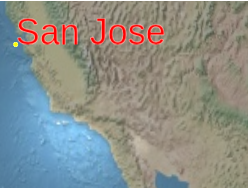 |
l.pixeloffset = new Cartesian2(25, 75);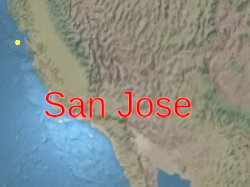 |
- Default Value: Cartesian2.ZERO
pixelOffsetScaleByDistanceNearFarScalar
根据标签与相机的距离获取或设置标签的近像素和远像素偏移缩放属性。
标签的像素偏移量将在NearFarScalar#nearValue和NearFarScalar#farValue之间缩放,而相机距离落在指定的NearFarScalar#near和NearFarScalar#far的上下边界内。
在这些范围之外,标签的像素偏移缩放仍然被限制在最近的范围内。
如果未定义,pixelOffsetScaleByDistance将被禁用。
Examples
// Example 1.
// Set a label's pixel offset scale to 0.0 when the
// camera is 1500 meters from the label and scale pixel offset to 10.0 pixels
// in the y direction the camera distance approaches 8.0e6 meters.
text.pixelOffset = new SuperMap3D.Cartesian2(0.0, 1.0);
text.pixelOffsetScaleByDistance = new SuperMap3D.NearFarScalar(1.5e2, 0.0, 8.0e6, 10.0);
// Example 2.
// disable pixel offset by distance
text.pixelOffsetScaleByDistance = undefined;positionCartesian3
获取或设置此标签的Cartesian位置。
scaleNumber
获取或设置与标签大小(以像素为单位)相乘的统一比例。
1.0不改变标签的大小,大于1.0的刻度会放大标签,小于1.0的正刻度缩小标签。
应用较大的比例值可能会使标签像素化。要使文本变大而没有像素化,在调用Label#font时使用更大的字体大小。
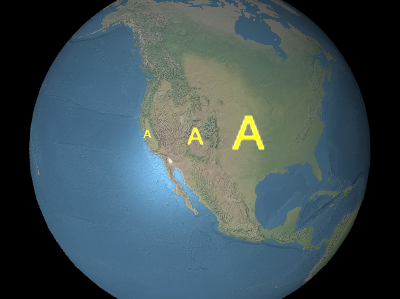
上图从左到右依次为
0.5、1.0、2.0。
- Default Value: 1.0
scaleByDistanceNearFarScalar
根据标签与相机的距离获取或设置标签的远近缩放属性。
标签的尺度将在NearFarScalar#nearValue和NearFarScalar#farValue之间插值,而相机距离落在指定的NearFarScalar#near和NearFarScalar#far的上下边界内。
在这些范围之外,标签的刻度仍然被限制在最近的范围内。
如果未定义,scaleByDistance将被禁用。
Examples
// Example 1.
// Set a label's scaleByDistance to scale by 1.5 when the
// camera is 1500 meters from the label and disappear as
// the camera distance approaches 8.0e6 meters.
label.scaleByDistance = new SuperMap3D.NearFarScalar(1.5e2, 1.5, 8.0e6, 0.0);
// Example 2.
// disable scaling by distance
label.scaleByDistance = undefined;showBoolean
决定是否显示该标签。用它来隐藏或显示标签,而不是将其删除并重新添加到集合中。
- Default Value: true
showBackgroundBoolean
决定是否显示该标签后面的背景。
- Default Value: false
styleLabelStyle
获取或设置此标签的样式。
- Default Value: LabelStyle.FILL
textString
获取或设置此标签的文本。
totalScaleNumber
Gets the total scale of the label, which is the label's scale multiplied by the computed relative size of the desired font compared to the generated glyph size.
- Default Value: 1.0
translucencyByDistanceNearFarScalar
根据标签与相机的距离获取或设置标签的近半透明属性和远半透明属性。
标签的半透明将在NearFarScalar#nearValue和NearFarScalar#farValue之间插值,而相机距离落在指定的NearFarScalar#near和NearFarScalar#far的上下边界内。
在这些范围之外,标签的半透明仍然被限制在最近的范围内。
如果未定义,则将禁用translucencyByDistance。
Examples
// Example 1.
// Set a label's translucencyByDistance to 1.0 when the
// camera is 1500 meters from the label and disappear as
// the camera distance approaches 8.0e6 meters.
text.translucencyByDistance = new SuperMap3D.NearFarScalar(1.5e2, 1.0, 8.0e6, 0.0);
// Example 2.
// disable translucency by distance
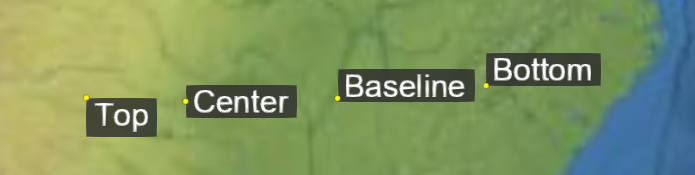
text.translucencyByDistance = undefined;verticalOriginVerticalOrigin
获取或设置此标签的垂直原点,该原点确定标签位于其锚位置的上方、下方还是中心。
- Default Value: VerticalOrigin.BASELINE
Example
// Use a top, right origin
l.horizontalOrigin = SuperMap3D.HorizontalOrigin.RIGHT;
l.verticalOrigin = SuperMap3D.VerticalOrigin.TOP;
Methods
-
computeScreenSpacePosition(scene, result){Cartesian2}
-
计算标签原点的屏幕空间位置,考虑视点偏移和像素偏移。 屏幕空间原点位于画布的左上角;X从左到右递增,y从上到下递增。
Name Type Description sceneScene 标签所在的场景。
resultCartesian2 可选 存储结果的对象。
Returns:
Type Description Cartesian2 标签的屏幕空间位置。 Example
console.log(l.computeScreenSpacePosition(scene).toString()); -
equals(other){Boolean}
-
确定此标签是否等于另一个标签。如果标签的所有属性都相等,则标签相等。不同集合中的标签可以相等。
Name Type Description otherLabel The label to compare for equality.
Returns:
Type Description Boolean trueif the labels are equal; otherwise,false. -
isDestroyed(){Boolean}
-
如果该对象已被销毁,则返回 true;否则返回 false。
如果该对象已被销毁,则不应使用;调用 isDestroyed 以外的任何函数都将导致DeveloperError异常。Returns:
Type Description Boolean 如果该对象已被销毁,则为 true;否则为 false。